Word Connect
- 4.8
- Rating
- 50.00M
- Installs
- Free
- Price
 Analysis by App-foxy
I spent time with Word Connect because its central idea is easy to understand but surprisingly effective: you build words from a small group of letters, then use that simple task as a quick form of vocabulary and attention training. It is a free word game from ZenLife Games Ltd, aimed at Everyone, and it runs on Android devices using version 8.0 or later. My first impression was that it works best when I treat it as a short mental break rather than as a game I need to rush through.
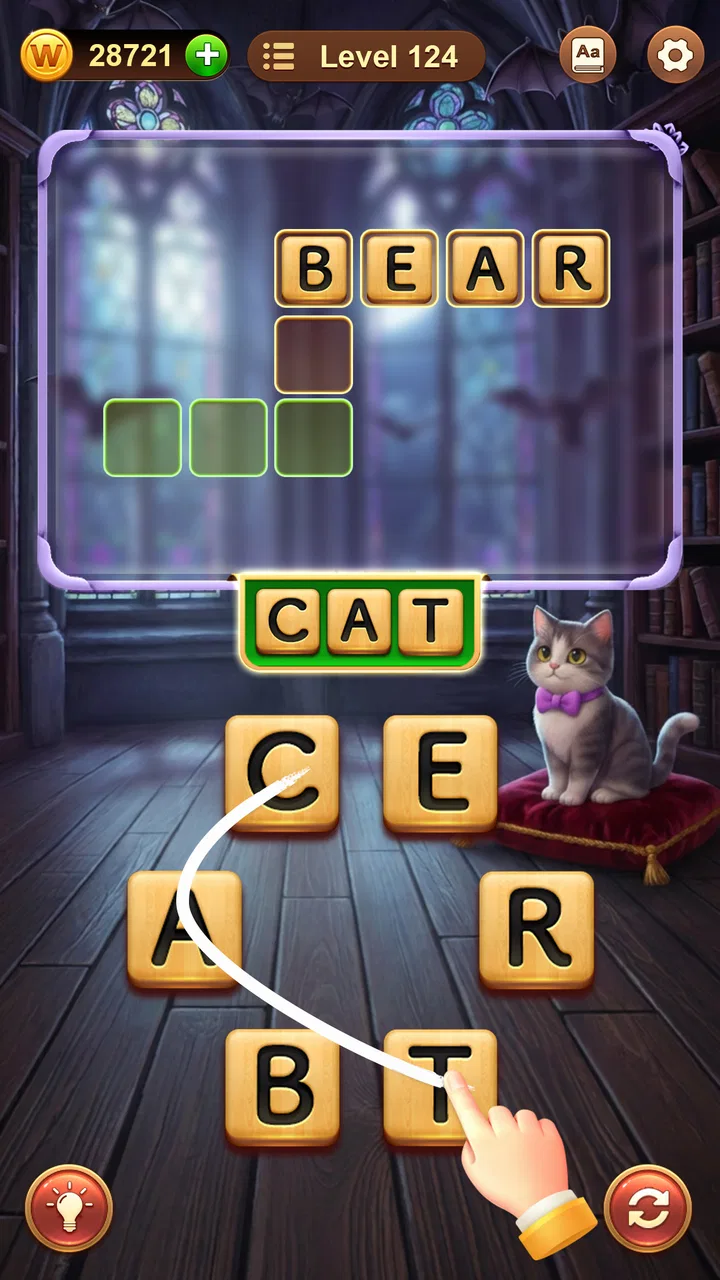
The basic appeal is immediate. You see a set of letters and try to connect them into valid words. Some answers arrive quickly, while others stay just out of reach until I rearrange the letters mentally or stop looking at them as a familiar pattern. That small change in perspective is the real strength here. The game does not need a complicated story or a large set of controls to keep me involved; the challenge comes from making my own brain search more carefully.
With an average rating of 4.8 from around 1.3 million ratings and more than 50 million installs, it has clearly reached a large audience. Those figures do not automatically make a game right for everyone, but they do fit my experience of a polished, approachable word puzzle that is easy to pick up. The current version is 9.214.490, and the game remains free to download, with optional in-app purchases ranging from $0.99 to $99.99 per item.
You May Also Like

 Blood Strike: 2.5 Anniversary
Blood Strike’s Loadouts Turn Every Drop Into a Tactical Gamble
A close look at Blood Strike’s custom loadouts: how fast access to signature weapons reshapes its battle royale rhythm, rewards preparation, and narrows the gap between fights.

 Pandora - Music & Podcasts
Pandora’s Music Is Easy to Start, but Harder to Recover
Pandora’s strength is its low-effort path from a seed to a station. Its weak spot is how much confidence it asks you to place in connection, setup, and quiet recovery.

 8 Ball Pool
8 Ball Pool Is Built on Rivalries, Rematches, and Routine
A close look at the rivalries, rematches, shared routines, and unanswered safety questions that turn a quick pool match into a persistent mobile community.

 Samsung Music
Samsung Music’s Quiet Strength Is Playing What You Already Own
Its reach comes less from spectacle than from dependable access to a personal library. That simplicity is both the app’s strongest retention engine and its ceiling.

 AccuWeather: Weather Radar
AccuWeather Review: A Quick, Clear Forecast for Everyday Decisions
For everyday plans, the best forecast is the one you can understand quickly. AccuWeather makes rain timing, radar, and local conditions easy to act on, with a few trade-offs.

 Hill Climb Racing
Why Hill Climb Racing Still Turns Crashes Into One More Run
A tiny car, a bumpy hill and one more upgrade: Hill Climb Racing keeps resurfacing because its simple chaos makes every near-miss feel personal.
More From Our News Desk



Why the letter-connection idea works so well
I like how Word Connect makes its appeal clear before I have to learn anything: the letters on screen give me an immediate puzzle, while the satisfaction comes from spotting combinations I initially missed. In this section, I’ll look at why that simple loop can hold my attention and how it sets up the goals and progress that follow.
A small puzzle with more depth than it first suggests
The most important capability is the way Word Connect turns a limited group of letters into several possible word searches. I am not simply answering a clue or selecting a definition. I have to notice combinations, test familiar endings, and decide whether a strange-looking arrangement might form a legitimate word. That makes each round feel active, even when the screen itself remains visually simple.
I especially like the difference between finding the words needed to move forward and finding extra words that are not immediately required. The first task is practical: solve enough of the puzzle. The second is exploratory: look for combinations that I may have overlooked. This gives the same letter set more than one purpose and makes a short session feel less disposable than a single-answer quiz.
The capability also creates a useful balance between confidence and doubt. I often recognize a likely word but hesitate because another arrangement seems possible. That hesitation is where the game earns its value. It encourages me to slow down, inspect the letters, and avoid assuming that the first obvious answer is the only answer.
What the game trains, and what it does not
I would describe the experience as light vocabulary practice combined with pattern recognition. It can make me more alert to prefixes, suffixes, common letter groupings, and the way a short word can hide inside a longer arrangement. It is not a structured language course, however. It does not replace reading, conversation, spelling practice, or a dictionary when I want a detailed explanation of a word.
That distinction matters if you are choosing it for a child, a language learner, or someone who wants measurable study progress. The Everyone content rating makes it broadly accessible, but accessible does not mean educational in a formal sense. I see the learning effect as incidental and useful: the game gives me repeated contact with word shapes, but it does not teach vocabulary in the organized way a dedicated language app would.
For me, the best result comes from paying attention to unfamiliar solutions instead of tapping through them and forgetting them. When a word feels new, I can pause and consider how its letters fit together. That habit turns a few minutes of play into something more worthwhile than simply chasing the next screen.
How I approach a difficult letter set
My most reliable method is to begin with the shortest words I can see. Short combinations help me understand which letters are likely to work together, and they often reveal a useful ending or starting point for longer answers. I then look for common patterns rather than trying random taps. This is faster and less frustrating than repeatedly dragging across the same letters without a plan.
A second useful habit is to change the direction of my thinking. If I keep searching for words that begin with one letter, I deliberately start with another. If I am focused on a long answer, I return to smaller combinations. This sounds minor, but it prevents the familiar problem of staring at the same arrangement until every letter begins to look meaningless.
I also avoid using help too quickly. When I am stuck, I give myself one brief reset: I put the phone down, look away, and return with a fresh view. That pause often works better than forcing the answer. If I eventually need assistance, using it after a genuine attempt feels more satisfying than spending it at the first sign of difficulty.
How it fits into an ordinary day
The strongest everyday scenario is a short waiting period. I can open it while waiting for an appointment, sitting on public transport, or taking a break between tasks. The word-building format suits these moments because I do not need to remember a complicated storyline or prepare a long session. I can solve a small portion, stop, and return later without feeling that I have abandoned a larger commitment.
It also works well after mentally tiring work. I sometimes want something more engaging than scrolling but less demanding than a full game. Searching through letters gives my attention a narrow target. The activity is active enough to interrupt a noisy train of thought, yet calm enough that I do not feel pressured to perform at a high speed.
Another realistic use is sharing the screen with a family member. One person may notice a short word while the other sees a longer possibility. Because the puzzle is easy to understand, the game can become a casual conversation starter without requiring both players to learn rules first. I would not call it a full multiplayer experience based on that use, but it can still support a friendly, cooperative moment.
Why it is more convenient than traditional word puzzles
Compared with a printed crossword, Word Connect removes the need for clues, a pencil, and a large uninterrupted block of time. That makes it more accessible when I want immediate play. Compared with a word-search book, it asks me to construct words rather than scan a fixed grid, so the mental task feels more flexible and less visually repetitive.
Compared with a dictionary-style vocabulary app, it is much more playful and less systematic. I am more likely to open it casually, but I am less likely to retain a carefully organized lesson from it. Compared with a competitive word game, it feels gentler because the emphasis is on solving the letter group in front of me rather than proving my speed against another person.
That comparison explains both its appeal and its limitation. If you want a relaxing word activity with a low barrier to entry, this format is a strong choice. If you want cryptic clues, deep definitions, head-to-head competition, or a clear course of language instruction, another category will probably serve you better.
The friction I noticed during longer sessions
The same simplicity that makes the game welcoming can make extended play feel repetitive. Once I have spent a long time solving similar letter arrangements, the basic interaction may no longer provide enough variety by itself. I prefer it in short bursts, where the central capability stays fresh instead of becoming a routine tapping exercise.
Difficulty can also feel personal rather than perfectly even. A puzzle may look easy because the letters are familiar, yet one missing combination can hold me up for several minutes. On another round, an unusual arrangement may suddenly become obvious. I enjoy that unpredictability, but someone who prefers a consistently measurable difficulty curve may find it irritating.
There is also a difference between discovering a word and understanding it. The game can prompt me to recognize a form I have seen before, but it is not designed around detailed definitions or examples. When I want to know exactly how a word is used, I need to leave the game and consult another source. That extra step is not a flaw in the puzzle itself, but it limits how far I can take the learning experience inside the app.
Free access and the purchase question
The game is free, which makes it easy to try without committing money first. Optional purchases are available, with individual items priced from $0.99 up to $99.99. I would approach those purchases carefully. The core appeal is the act of searching for words, so I would not spend simply because a difficult puzzle makes me impatient.
My practical rule is to play each puzzle for a little longer before considering any assistance. The value of the game comes from the thinking, and removing every obstacle can weaken the very experience that makes it enjoyable. If you are installing it for a child, I would also make sure purchase controls on the device match your household preferences, especially because the listed purchase range includes both small and much larger options.
This is one of the clearest trade-offs: convenience can shorten frustration, but it can also shorten the challenge. I prefer to regard optional purchases as a last resort rather than part of the normal rhythm of play. That approach keeps the free format feeling fair and preserves the satisfaction of solving a stubborn letter set independently.
Who will get the most from it
I think Word Connect is best for people who enjoy word puzzles but do not want to learn complicated rules. It suits casual players, commuters, families looking for a simple shared activity, and anyone who likes a quiet brain break. It is also a reasonable choice for people who enjoy testing their vocabulary informally, provided they understand that it is not a complete educational program.
It may be particularly helpful for someone who struggles to find a small offline-style activity between responsibilities. The rounds give attention somewhere specific to go, and the letter groups are easier to approach than a blank page. I would recommend starting with a few minutes at a time rather than making a large promise to play every day. The game works best when it fits naturally into your routine.
I would be less likely to recommend it to a player who needs constant novelty, a strong narrative, detailed explanations, or social competition. A serious crossword fan may find the word-building format too guided, while a language student may quickly want definitions, pronunciation, and lesson structure. In those cases, a crossword app, a competitive word title, or a dedicated language-learning tool would be a better match.
My final view after using the letter search as a daily break
What stays with me is not a single spectacular feature but the practical effect of the central one. Connecting letters gives me a focused task that is easy to start and difficult enough to hold my attention for a while. I can use it during a pause in the day, stop without much ceremony, and return when I want another small challenge.
The best way to enjoy Word Connect is to treat it as a compact mental workout, not as a full language course or an endless competitive game. That expectation makes its strengths clearer. It is approachable, free to begin, suitable for Everyone, and supported by the broad reach it has achieved since its release on June 5, 2017. Its weaknesses—repetition during long sessions, limited word explanation, and the temptation to rely on optional purchases—are real, but manageable.
For my own use, I would keep it installed for waiting rooms, short breaks, and those moments when I want to replace passive scrolling with something that asks a little more from me. If that sounds like your kind of break, I think Word Connect is worth trying. If you need deep vocabulary instruction or a richer competitive structure, I would choose a more specialized alternative instead.
FAQs for Word Connect
01What is Word Connect and how does it work?
Word Connect is a word puzzle game designed to test and enhance your vocabulary. Players connect letters to form words and complete levels. The game features a simple drag-and-connect mechanism, allowing players to swipe between letters to find the correct words. With each level, the complexity increases, challenging your word-building skills.
02Is Word Connect free to play, and are there in-app purchases?
Yes, Word Connect is free to download and play. However, it includes in-app purchases for hints and additional game content. These purchases are optional and can enhance gameplay by providing extra help when you're stuck on a difficult level. It's important to manage in-app purchases through your device settings if needed.
03Does Word Connect require an internet connection to play?
Word Connect can be played offline, making it a great option for entertainment without internet access. However, certain features, such as leaderboards or updates, may require an internet connection. Playing offline ensures that you can enjoy the game anywhere, anytime, without worrying about connectivity.
04What are the age restrictions for Word Connect?
Word Connect is suitable for players of all ages, generally rated for ages 4 and up. Its simple gameplay and educational value make it an excellent choice for children and adults alike. Parents may find it beneficial for developing their child's vocabulary and spelling skills in a fun and engaging way.
05How can I get help if I'm stuck on a level in Word Connect?
If you're stuck on a level in Word Connect, you can use hints to reveal letters or words. These can be purchased with in-game currency or real money. Additionally, you might find it helpful to shuffle the letters or take a break and come back with a fresh perspective. Online forums and communities can also provide tips and solutions.
Pros
- Engaging word puzzles enhance vocabulary.
- Simple interface is easy to navigate.
- Offline mode available for uninterrupted play.
- Daily challenges keep the game fresh.
- Multiple languages support broadens access.
Cons
- In-app purchases can be frequent.
- Ads may interrupt gameplay at times.
- Limited hints without purchase.
- Levels can feel repetitive over time.
- No multiplayer mode for competitive play.

Word Connect
Gallery